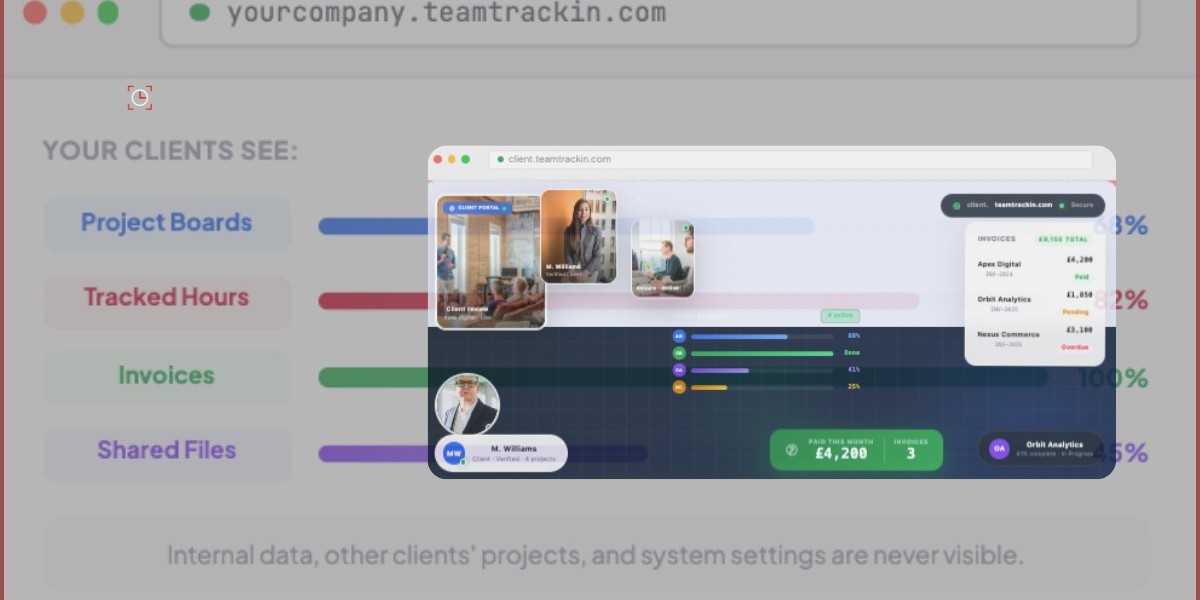
Your clients deserve more than a weekly email update and a PDF invoice attached to a thread that's three pages long. In 2026, the way businesses communicate with clients has changed — and the agencies, consultancies, and service teams that are winning are the ones giving clients a dedicated, professional space to see everything in one place.
That space is called a client portal. And if you're not offering one, there's a very real chance your competitors already are.
In this guide, we'll break down exactly what a client portal is, why it's become essential for workforce management and service businesses, what features actually matter, and how TeamTrackin's built-in Client Portal — available at your own branded subdomain — gives you everything you need without the complexity of a separate tool.
? Industry Stat According to research by Salesforce, 80% of customers say the experience a company provides is just as important as its products or services. A dedicated client portal is one of the most direct ways to elevate that experience. |
What is a Client Portal?
A client portal is a secure, web-based workspace that gives your clients controlled access to the information they care about — project progress, tracked hours, shared files, invoices, and more — without needing to call, email, or chase anyone for updates.
Think of it as a private dashboard built specifically for your clients. They log in, see what's happening in real time, and have everything they need at their fingertips. In the back-and-forth. No unanswered WhatsApp messages. No 'can you send me the latest version?'
For businesses that manage multiple clients simultaneously — agencies, staffing firms, IT service providers, consultancies, accountants — a client portal isn't just a nice feature. It's operational infrastructure.
Why Client Portals Matter More Than Ever
The shift to remote and hybrid work has made client communication both more important and more fragmented. Projects span multiple tools, timelines stretch across time zones, and clients expect the same level of transparency they'd get if they were sitting in your office.
Here's what's driving the demand for client portals in 2026:
1. Clients Expect Real-Time Visibility
Gone are the days when a fortnightly status call was enough. Today's clients — especially in professional services — want to see progress as it happens. They want to know how many hours have been logged, which tasks are complete, and whether the project is on track. A client portal delivers that visibility without you having to manually compile reports every week.
2. Email Is No Longer a Reliable Collaboration Channel
Email threads get long. Attachments get lost. Version control becomes a nightmare. A client portal gives every document, update, and invoice a permanent home — one that both your team and your client can access at any time, from any device.
3. Professionalism Builds Trust
When a client receives a link to yourcompany.teamtrackin.com — a branded workspace built just for them — the message is clear: you're organized, you're professional, and you take their account seriously. That impression matters enormously for customer retention.
4. It Reduces Internal Admin Burden
Every 'quick update email' your team sends takes time. Every invoice query takes time. Every file request takes time. A client portal eliminates most of these touchpoints, freeing your team to focus on delivery rather than communication management.
? Pro Tip Businesses that implement a self-service client portal report up to a 30% reduction in inbound client queries. That's hours saved every week — across every account manager on your team. |
Key Features to Look for in Client Portal Software
Not all client portals are created equal. Some are standalone tools that require separate subscriptions and integrations. Others are built directly into your workforce management or time tracking platform — which is exactly how it should be. Here's what to look for:
Branded Workspace
Your client portal should reflect your business, not the software company behind it. Look for a solution that gives you a custom subdomain — like yourcompany.teamtrackin.com — so clients arrive at a space that feels like yours, not a generic SaaS product.
Project Board Access
Clients should be able to see the status of their projects at a glance. Which tasks are in progress? What's been completed? What's coming up next? A clear, well-structured project board removes ambiguity and aligns expectations without the need for a status meeting.
Time Tracking Visibility
For service businesses that bill by the hour — or simply want to demonstrate the value of the work being done — showing clients tracked hours in real time is a game-changer. It builds trust, supports billing transparency, and removes disputes before they start.
Invoice Management
Clients shouldn't have to dig through their email to find last month's invoice. A client portal that surfaces invoices directly in the workspace keeps billing organized and speeds up payment cycles.
File Sharing & Document Access
Whether it's a contract, a deliverable, or a shared resource, file management within the portal keeps everything in one place. No more emailing attachments. No more 'can you resist that?' moments.
Secure Access Controls
Different clients should only see their own information. Robust role-based access controls ensure that each client's workspace is entirely private and secure — a non-negotiable in any professional services environment.
Client Portal vs Traditional Client Communication: A Direct Comparison
Area | Email & Calls | Client Portal (TeamTracking) |
|---|---|---|
Project Updates | Manual, scheduled, easy to miss | Real-time, always available |
Hour Tracking | Sent as spreadsheet or report | Live dashboard in the portal |
Invoicing | Emailed PDF, often buried | Accessible directly in workspace |
File Sharing | Email attachment chaos | Centralized, organized, searchable |
Branding | Generic email signature | Branded subdomain (yourco.teamtrackin.com) |
Client Trust | Variable — depends on response time | High — clients feel in control |
Admin Time | High — requires manual effort | Low — self-service for clients |
How TeamTrackin's Client Portal Works
TeamTrackin isn't just a time tracking tool — it's a full workforce management platform that now includes a built-in Client Portal, designed specifically for service businesses that want to give clients a professional, branded experience without adding another subscription to their tech stack.
Here's how it works:
Your Own Branded Subdomain
Every TeamTrackin Client Portal is hosted at yourcompany.teamtrackin.com. This gives your clients a clean, professional URL that's clearly associated with your business — not a generic tool. It's a small detail that makes a significant impression.
Project Board Visibility
Clients can log in and view their project boards directly. They can see task statuses, project timelines, and overall progress — giving them the real-time visibility they expect without requiring a meeting to deliver it.
Tracked Hours — Transparently
TeamTrackin's core strength is accurate, automated time tracking. Your team logs hours as they work — and your clients can see exactly how that time is being spent. For hourly billing, this is particularly powerful: it removes invoice disputes before they arise and builds a culture of transparency with every account.
Invoice Access
Invoices are surfaced directly in the client's portal workspace. No more hunting through inboxes. No more 'I never received that.' Clients can view and download their invoices at any time.
Shared File Management
Upload contracts, deliverables, reports, and shared resources — and clients can access them whenever they need them. Everything stays organized within their portal, making your team look polished and prepared.
? Ready to Launch? Setting up your TeamTrackin Client Portal takes minutes. Visit teamtrackin.com to get started and give your clients the branded workspace they deserve. |
Who Benefits Most from a Client Portal?
While any business with ongoing client relationships can benefit from a client portal, the following types of organizations see the most immediate impact:
- Digital agencies managing multiple client projects simultaneously
- IT managed service providers tracking hours and support tickets
- Staffing and recruitment firms sharing candidate pipelines and timesheets
- Marketing consultancies delivering campaign reports and creative assets
- Accountancy firms sharing financial documents and billing records
- HR and payroll providers offering staff management dashboards to clients
- Software development studios sharing sprint progress and tracked developer hours
In each case, the client portal serves the same purpose: it gives the end client a single, reliable place to check in on progress, access documents, and feel confident that the work is moving forward — without requiring your team to spend time on manual updates.
How to Implement a Client Portal Without Disrupting Your Workflow
One of the most common concerns businesses have when considering a client portal is the implementation overhead. The good news is that with TeamTrackin, the setup process is designed to fit around your existing workflows — not replace them.
Step 1: Set Up Your Branded Portal
Log in to your TeamTrackin account and configure your Client Portal at your branded subdomain. This takes minutes, not days.
Step 2: Assign Clients to Their Workspaces
Add your clients to the portal and assign them to their respective project workspaces. Access controls ensure that each client only sees their own data.
Step 3: Let Time Tracking Do the Heavy Lifting
As your team continues to log hours and update projects through TeamTrackin's standard time tracking interface, that data flows automatically into each client's portal view. There's no additional data entry required.
Step 4: Share the Portal Link with Your Clients
Send each client their portal URL — yourcompany.teamtrackin.com — and let them explore. Most clients will immediately appreciate having a dedicated space to check progress, find files, and view invoices.
Frequently Asked Questions
What is a client portal in workforce management?
A client portal in workforce management is a secure, web-based space where service businesses give their clients direct visibility into project progress, tracked hours, invoices, and shared files. It replaces manual reporting and email-based updates with a real-time, self-service dashboard.
Is TeamTrackin's Client Portal included in the standard plan?
TeamTrackin's Client Portal is available as part of the platform's feature set. Visit teamtrackin.com to see current pricing and plan details.
Can I customize my client portal with my own branding?
Yes. TeamTrackin's Client Portal is hosted at a branded subdomain in the format yourcompany.teamtrackin.com, giving your clients a professional, branded experience when they log in.
How does the client portal handle data security?
Each client workspace is access-controlled, meaning clients only see data relevant to their projects. TeamTrackin's platform is built with security best practices to protect sensitive business and billing information.
Can clients view real-time hours in the portal?
Yes. One of TeamTrackin's core strengths is real-time time tracking — and that data is surfaced directly in the client portal, giving clients full visibility into how hours are being allocated across their projects.
Do I need separate software for a client portal?
Not with TeamTrackin. The Client Portal is built directly into the platform, meaning your time tracking, project management, and client visibility tools all live in one place — no integrations required.
Conclusion: Give Your Clients the Experience They Expect
The businesses that win in 2026 are the ones that make their customers feel informed, valued, and in control. A client portal is one of the most direct ways to achieve that — and with TeamTrackin, it's already built in.
Whether you're an agency managing ten clients or a consultancy serving one enterprise account, the TeamTrackin Client Portal gives you a branded, professional workspace that your clients will notice and appreciate from day one.
Stop sending status emails. Stop chasing invoice queries. Stop losing files in email threads. Give your clients a portal — and give your team back the time they deserve.
? Get Started Today Visit teamtrackin.com to explore the Client Portal feature and start your free trial. Set up your branded workspace at yourcompany.teamtrackin.com and transform the way you work with clients. |